
en:resources:pattern_tools_reference:tool-curve
This is an old revision of the document!
Table of Contents
Curve
Allow users to create curve by using this tool. Users can draw the curve directly, and do not have to use Segment Tool to draw a segment and then drag it into curve by using Curve Tool; allow users to move a group of control/regular points by entering desired value or by freehand, which improves the efficency of pattern-making.
Draw a curve as desired
SelectCurve Tool, left-click to draw a curve. Three points make a curve.


NOTE
- Three points make a curve. Because the limition of points, the curve is not smooth enough, so users can add more points on the curve by using Add Point Tool to adjust the curve. >
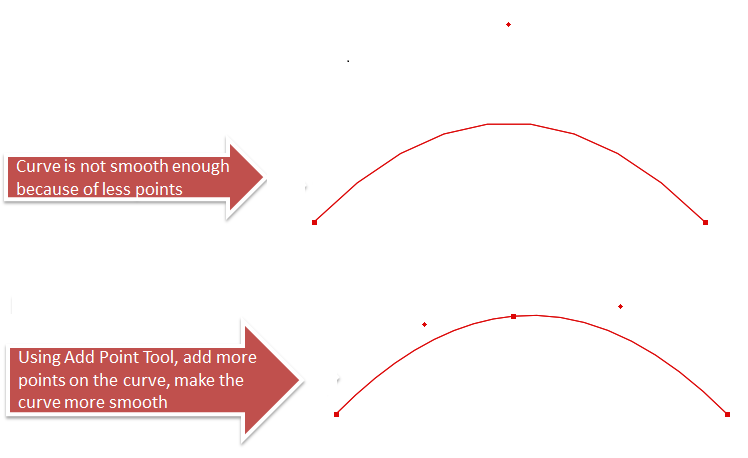
- Allow users to move the curve point to modify the bending of the curve. >
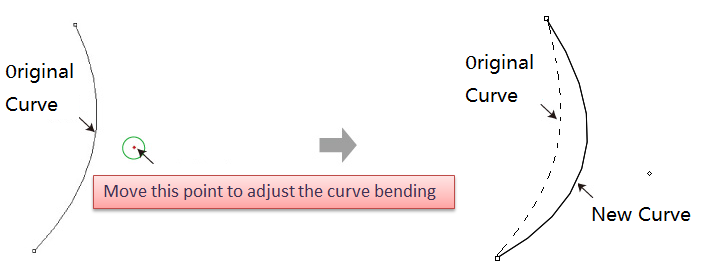


Move a group of curve point (control point) as desired
- Select the desired curve;
- Select
- Left-click one of the curve point without releasing the mouse button, drag the curve to desired area then release the button. >

Move a group of curve points (control points) or regular point by entering specific value
- Select the desired curve;
- Select
- Holding down Alt key (Windows) or Option key (Mac), left-click the desired point or segment;
- Dialog box appears, enter specific number and click OK. >

en/resources/pattern_tools_reference/tool-curve.1757582813.txt.gz · Last modified: by administrator